From basics to internals — architecture, objects, storage, networking, and everything in between.
Contents
- Quick Primer
- Host OS: How Docker Actually Runs
- Architecture Deep Dive
- Docker Objects
- Storage Deep Dive
- Networking Deep Dive
- Builds, Multi-Arch & Image Optimization
- Resource Limits & Constraints
- Logging & Observability
- Security
- Kernel Internals: Namespaces & cgroups
- Runtime Behavior: PID 1, Signals, Health
- Registry & Day-2 Operations
- Docker & Kubernetes
- Alternatives
- Command Reference
- Interview Questions
- References
1. Quick Primer
Docker packages an app plus dependencies into an immutable, layered image that runs as an isolated process — a container — on any host with a compatible kernel. It kills environment drift ("works on my machine") and gives a portable distribution format via registries [1].
Workflow: Build → Ship → Run.
A container is just a host process, constrained in what it can see (namespaces) and use (cgroups) [2].
| Virtual Machine | Container | |
|---|---|---|
| Virtualizes | Hardware (hypervisor) | OS (shares host kernel) |
| Size / boot | GBs / minutes | MBs / milliseconds |
| Isolation | Strong (own kernel) | Process-level (ns + cgroups) |
🗺️ How it all fits together
📄 Dockerfile
Declarative recipe — each instruction creates a layer or sets metadata. The source code of your image.
FROM → RUN → COPY → CMD↓ docker build ↓
📦 Image
Read-only, layered, content-addressed template. Layers are deduplicated — 10 images sharing one base store that base once on disk. Identified by tag (mutable) or digest (immutable).
manifest + config + layers↓ docker run ↓
▶️ Container
A running process = image layers (read-only) + thin writable layer (CoW). Ephemeral — writable layer destroyed on removal. Has its own PID, network, mount namespaces.
process + writable layer + namespaces⇠ connects to ⇢
💾 Volume
Docker-managed persistent storage. Survives container removal. Supports drivers (NFS, cloud).
bypasses OverlayFS🌐 Network
Virtual network (bridge/host/overlay). User-defined bridges get embedded DNS for name resolution.
bridge / host / overlay☁️ Registry
Stores and distributes images. Docker Hub (public) or private (ECR, Harbor, Artifact Registry).
push / pull2. Host OS: How Docker Actually Runs
Containers are a Linux kernel feature. A container shares the host's kernel — it does not ship one.
On Linux, everything runs directly on the host kernel — no VM.
On macOS / Windows, Docker Desktop runs a hidden LinuxKit VM:
Implications: bind mounts cross the VM boundary (slow — prefer volumes), use host.docker.internal to reach the host, and an amd64 image won't run on arm64 (Apple Silicon) without emulation — hence multi-arch images [3][4].
3. Architecture Deep Dive
3.1 The Runtime Stack
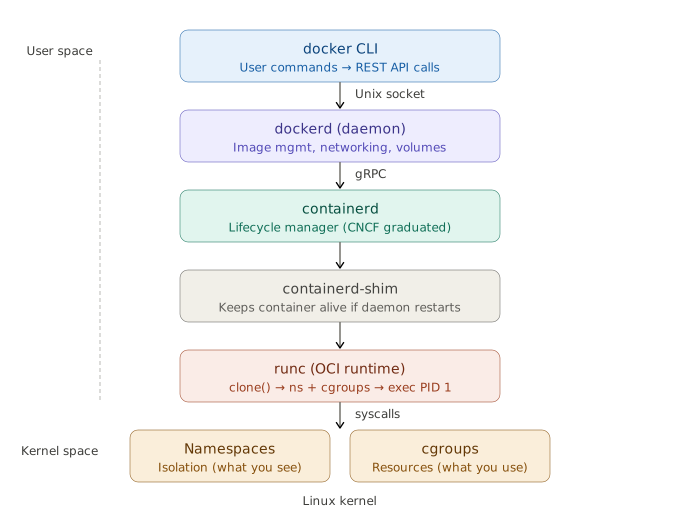
3.2 Tracing docker run nginx
dockerCLI — parses command, sends JSON todockerdvia the socket. Thin client — no container logic [5].dockerd— resolves the image (local → registry pull), sets up networking (veth, bridge, iptables), prepares volumes, hands tocontainerd[1].containerd— pulls/unpacks layers, creates writable snapshot, starts the container. K8s talks to this directly via CRI [6].containerd-shim— one per container. Decouples from daemon sodockerdrestarts don't kill containers [5].runc—clone()into namespaces, configure cgroups, mount OverlayFS rootfs, drop caps, apply seccomp/AppArmor,exec()PID 1 [5].- Linux Kernel — namespaces isolate; cgroups limit. That's a container.
This decoupling is why Kubernetes could drop Docker but keep containerd.
⚠️ The socket (
/var/run/docker.sock) is root-equivalent — control of it = control of the host.
3.3 OCI
The Open Container Initiative defines the image-spec and runtime-spec. OCI compliance is why a Docker/Buildah/Kaniko image runs under containerd/CRI-O/Podman unchanged — no lock-in [7].
4. Docker Objects
Everything Docker manages is an object tracked by the daemon, inspectable with docker inspect.
4.1 How Objects Relate
4.2 Dockerfile
Each instruction either creates a filesystem layer or sets metadata:
| Creates a layer | Metadata only |
|---|---|
FROM, RUN, COPY, ADD | WORKDIR, ENV, ARG, EXPOSE, USER, CMD, ENTRYPOINT, HEALTHCHECK, LABEL |
4.3 Image — the Immutable Template
- Layers are content-addressed by digest (SHA-256). Identical layers stored once — 10 images on the same base share that base on disk [8].
- Tags (
myapp:1.0) are mutable pointers. Digests (myapp@sha256:...) are immutable. Pin by digest in production.
4.4 Container — the Running Instance
A container = image layers (read-only) + thin writable layer (copy-on-write). The writable layer is destroyed on docker rm.
What the container gets: own PID namespace (PID 1 = entrypoint), own network namespace (veth pair to bridge), own mount namespace (OverlayFS), and cgroup resource limits.
4.5 Volume
Volumes bypass OverlayFS — data goes directly to the host filesystem. They survive docker rm, support drivers (NFS, cloud block), and can be shared across containers.
4.6 Other Objects
| Object | What |
|---|---|
| Network | Virtual connectivity (bridge/host/overlay/macvlan) |
| Secret (Swarm) | Sensitive data, in-memory at /run/secrets/ |
| Config (Swarm) | Non-sensitive config delivered to services |
| Plugin | Extends daemon (volume/network/log drivers) |
| Service/Stack (Swarm) | Declarative replicated deployment |
5. Storage Deep Dive
5.1 OverlayFS — How Layers Become One View
On disk: /var/lib/docker/overlay2/<id>/ → diff/ (changes), link, lower, work/.
Here's what's happening in that diagram:
- lowerdir (the blue layers) — these are the read-only image layers, stacked bottom-up. Layer 1 is your base image (
FROM node:20-slim), and each layer above adds changes from a Dockerfile instruction. They are immutable — Docker never modifies them. - upperdir (the orange layer) — this is the container's writable layer, created when the container starts. Every file you create, modify, or delete at runtime lands here. It's ephemeral — destroyed when you
docker rmthe container. - merged (the green view) — this is what the container process actually sees when it does
ls /. OverlayFS takes the stack of read-only layers plus the writable layer and presents them as a single, unified filesystem. The container has no idea it's looking at multiple layers. - workdir — internal scratch space OverlayFS uses for atomic operations. You never interact with it directly.
5.2 Copy-on-Write
- First write to a large file = expensive (entire file copied up).
- Write-heavy workloads balloon the writable layer → use a volume instead [9].
- Deleting in a later Dockerfile
RUNdoesn't shrink the image — data persists in the earlier layer.
5.3 containerd Snapshotter
Docker Engine 29.0+ defaults to the containerd image store using snapshotters instead of classic graph drivers. Adds native multi-platform images and attestations. Content moves to /var/lib/containerd. Switching hides (doesn't delete) existing overlay2 images [10].
5.4 Storage Comparison
| Type | Where | Use for |
|---|---|---|
| Volume | /var/lib/docker/volumes | Prod data, write-heavy, portable |
| Bind mount | Exact host path | Dev (live reload) — slow across VM |
| tmpfs | RAM | Secrets, scratch — never persisted |
6. Networking Deep Dive
6.1 Bridge Internals
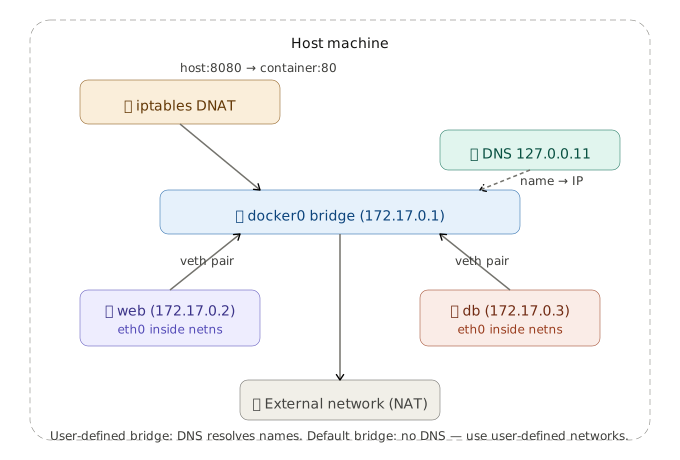
⚠️ Embedded DNS (name → IP) works only on user-defined bridges. The default bridge lacks it. Always create a user-defined network.
6.2 Drivers
| Driver | Behavior |
|---|---|
| bridge (default) | Private virtual bridge, NAT, per-container IP |
| host | Shares host network — no isolation, no port mapping |
| overlay | VXLAN across hosts — multi-host / Swarm |
| macvlan | Container gets own MAC/IP on physical LAN |
| none | No networking |
7. Builds, Multi-Arch & Image Optimization
7.1 Multi-Stage Builds
FROM golang:1.22 AS build
WORKDIR /src
COPY . .
RUN go build -o /app/server .
FROM gcr.io/distroless/base-debian12
COPY /app/server /server
ENTRYPOINT ["/server"]
7.2 Cache-Friendly Ordering
COPY package.json .      # rarely changes → cached
RUN npm ci
COPY . .                 # changes often → only this rebuilds
Changed layer rebuilds itself and everything after it.
7.3 Multi-Arch
docker buildx build --platform linux/amd64,linux/arm64 -t user/app:1.0 --push .
7.4 Size Checklist
- Minimal base (
-slim/ distroless / Alpine). - Combine RUN + cleanup in one layer — cleaning later doesn't shrink earlier layers.
- Multi-stage to drop build deps;
.dockerignoreto shrink context. - Alpine caveat: musl libc can break DNS / glibc wheels — distroless often safer.
8. Resource Limits & Constraints
docker run --memory=512m --memory-swap=512m \
           --cpus=1.5 \
           --pids-limit=200 \
           --restart=on-failure:3 myapp
Exceeding --memory → kernel OOM-kills the process (exit 137). Always set limits in production.
9. Logging & Observability
Default json-file driver doesn't rotate — classic disk-fill incident. Fix in /etc/docker/daemon.json:
{ "log-driver": "json-file", "log-opts": { "max-size": "10m", "max-file": "3" } }
Other drivers: local, journald, syslog, fluentd, awslogs.
10. Security
| Control | How |
|---|---|
| Non-root | USER appuser |
| Least capability | --cap-drop=ALL --cap-add=<needed> |
| Read-only rootfs | --read-only + tmpfs |
| No escalation | --security-opt=no-new-privileges |
| Kernel confinement | seccomp + AppArmor/SELinux |
| Small surface | distroless / minimal base |
| Supply chain | scan (Trivy) + sign (cosign) + pin by digest |
| Secrets | runtime injection — never bake into layers |
| Daemon | guard the socket; prefer rootless |
11. Kernel Internals: Namespaces & cgroups
Namespaces (what a process can see):
| Namespace | Isolates |
|---|---|
pid | Process IDs |
net | Interfaces, routes, ports |
mnt | Mount points |
uts | Hostname |
ipc | Shared memory |
user | UID/GID mapping |
cgroup | cgroup root view |
cgroups (what a process can use): CPU, memory, I/O limits.
- v1: per-controller hierarchies — inconsistent.
- v2: unified hierarchy, better accounting + PSI, required for rootless. Modern default.
12. Runtime Behavior: PID 1, Signals, Health
- PID 1 trap: PID 1 gets no default signal handlers. Naive PID 1 ignores SIGTERM → gets SIGKILLed. Fix:
docker run --init(tini). - Exec form (
["bin","arg"]) — signals reach your process. Shell form wraps in/bin/sh -cand swallows them. - Exit codes:
137= SIGKILL (OOM),143= SIGTERM,125= daemon error,126= not executable,127= not found. - Restart policies:
no|on-failure[:max]|always|unless-stopped.
13. Registry & Day-2 Operations
Tags are mutable; digests are immutable. Deploy by digest.
docker system df                         # what's using disk
docker system prune -a --volumes         # remove everything unused
Daemon config: /etc/docker/daemon.json (storage, log rotation, mirrors, data-root).
14. Docker & Kubernetes
Docker Engine isn't CRI-compliant, so K8s maintained dockershim — deprecated v1.20, removed v1.24 [11][12]. Images are unaffected (OCI, run on containerd/CRI-O). Only Docker-as-the-node-runtime was removed [13].
15. Alternatives
| Tool | What |
|---|---|
| Podman | Daemonless, rootless, Docker-compatible CLI |
| containerd | High-level runtime under K8s (CNCF) |
| CRI-O | Minimal CRI runtime, OpenShift default |
| Buildah / Kaniko | Daemonless image builders for CI |
| Rancher / Colima | Free Docker Desktop replacements |
| gVisor / Kata | Sandboxed runtimes for untrusted code |
16. Command Reference
# Images
docker build -t app:1.0 .       docker images        docker history <img>
docker pull|push <img>          docker rmi <img>

# Containers
docker run -d -p 8080:80 --init --memory=512m nginx
docker run -it ubuntu bash      docker ps [-a]       docker exec -it <c> bash
docker stop|start|restart <c>   docker logs -f <c>   docker inspect <c>
docker stats                    docker rm <c>

# Volumes / Networks / System
docker volume create|ls|prune     docker network create|ls
docker system df                  docker system prune -a --volumes
docker info                       docker version

# Compose
docker compose up -d | down | logs -f | ps
17. Interview Questions
Beginner
Q1. What is Docker and what problem does it solve?
Docker packages an app with all its dependencies into an immutable, layered image that runs as an isolated container on any compatible host. The core problem: environment drift — mismatched libraries between dev and prod. Docker ships the environment with the code, making builds reproducible. It also standardized a distribution format (images + registries) that became the OCI standard [1][7].
Q2. Image vs. container vs. Dockerfile?
Dockerfile = recipe (source). Image = built, read-only artifact (binary). Container = running instance (process) — image layers + writable layer. Mental model: source → binary → process. Many containers share one image because layers are read-only; only the writable layer differs [8].
Q3. Container vs. VM — the trade-off?
VM virtualizes hardware (hypervisor, full guest OS) — strong isolation, GBs, minutes. Container virtualizes the OS, shares host kernel — MBs, milliseconds. Trade-off: VM has a stronger security boundary (separate kernel); container shares the kernel, so a kernel exploit crosses containers. That's why untrusted workloads use Firecracker or Kata.
Q4. Why does my container run on a Mac?
Docker Desktop runs a hidden LinuxKit VM. Containers share that VM's kernel, not macOS. Bind mounts are slow (cross VM), use host.docker.internal to reach the host [3][4].
Intermediate
Q5. Walk docker run from CLI to kernel.
CLI → REST over socket → dockerd resolves/pulls image → containerd (gRPC) → shim → runc → clone() into namespaces, set cgroups, mount OverlayFS, drop caps, seccomp/AppArmor, exec PID 1. Shim keeps container alive if daemon restarts. This decoupling is why K8s dropped Docker but kept containerd [5][6].
Q6. How does copy-on-write work?
overlay2 does a copy_up on first write: entire file copied from lowerdir to upperdir, edits happen there. Deletes create whiteout files. Write-heavy workloads balloon the writable layer → use volumes [9].
Q7. Volumes vs. bind mounts vs. tmpfs.
Volumes = Docker-managed, portable, bypasses OverlayFS, prod data. Bind mounts = exact host path, dev convenience, slow across VM. tmpfs = RAM, secrets, never persisted.
Q8. Container-to-container name resolution?
User-defined bridge → embedded DNS at 127.0.0.11 resolves names to IPs. Default bridge lacks this. Always use user-defined networks.
Q9. CMD vs ENTRYPOINT; COPY vs ADD.
ENTRYPOINT = fixed executable; CMD = default args (overridable). Always exec form — shell form wraps in /bin/sh -c, breaks signal delivery. COPY just copies; ADD also fetches URLs + extracts tarballs — prefer COPY.
Q10. Container lifecycle and restart policies.
created → running → paused → exited → removed. PID 1 exits → container stops. PID 1 nuance: no default signal handlers, must reap orphans — use --init/tini.
Advanced
Q11. overlay2 vs. containerd snapshotter.
overlay2 = classic graph driver. Engine 29.0+ defaults to containerd image store using snapshotters — native multi-platform images, attestations, content in /var/lib/containerd. Switching hides existing images [10].
Q12. Shrink images / speed builds.
Multi-stage; minimal base; cache-friendly ordering (deps before code); combine RUN+cleanup in one layer; .dockerignore; BuildKit cache mounts. Alpine/musl caveat.
Q13. Secure a container in production.
Non-root; drop caps; read-only rootfs; no-new-privileges; seccomp/AppArmor; scan + sign + pin by digest; runtime secrets; guard socket / go rootless; gVisor/Kata for untrusted code.
Q14. cgroups v1 vs v2.
v1 = per-controller, inconsistent. v2 = unified, better accounting + PSI, required for rootless. Probes whether you've debugged OOM/throttling in prod.
Q15. Why did K8s remove dockershim?
Docker isn't CRI-compliant; shim duplicated work. Removed in 1.24. Images are fine (OCI); only Docker-as-runtime went [11][12][13].
Q16. Debug a CrashLoopBackOff.
docker logs → docker inspect (exit code, OOMKilled) → check limits → docker run --entrypoint sh. Exit codes: 137=OOM, 143=SIGTERM, 125/126/127. Reproduce against exact digest.
Q17. Why do containers get SIGKILLed?
docker stop → SIGTERM → 10s → SIGKILL. Failures: shell-form ENTRYPOINT (signal hits sh), naive PID 1 (no handler). Fix: exec form + --init.
Q18. Docker socket + log disk problem.
Socket is root-equivalent; prefer rootless. Default json-file logging doesn't rotate → set max-size/max-file or ship logs off-box.
18. References
- Docker Docs — Docker overview. https://docs.docker.com/get-started/overview/
- R. Rosen — Namespaces and Cgroups (CMU). https://www.andrew.cmu.edu/course/14-712-s20/applications/ln/Namespaces_Cgroups_Conatiners.pdf
- Docker Blog — The Magic Behind Docker Desktop. https://www.docker.com/blog/the-magic-behind-the-scenes-of-docker-desktop/
- Microsoft Learn — Docker containers on WSL. https://learn.microsoft.com/en-us/windows/wsl/tutorials/wsl-containers
- Srinivasa — Inside Docker: CLI to Kernel. https://dev.to/srinivasamcjf/inside-docker-the-complete-architecture-explained-from-cli-to-kernel-4mf1
- Huu Phan — Docker Alternatives (containerd). https://www.huuphan.com/2026/03/top-docker-alternatives-2026.html
- Red Hat — The History of Containers. https://www.redhat.com/en/blog/history-containers
- OneUptime — Docker UnionFS and Overlay2. https://oneuptime.com/blog/post/2026-02-08-how-to-understand-docker-unionfs-and-overlay2/view
- Docker Docs — Storage drivers. https://docs.docker.com/engine/storage/drivers/
- Docker Docs — containerd image store. https://docs.docker.com/engine/storage/containerd/
- Kubernetes Blog — Moving on From Dockershim. https://kubernetes.io/blog/2022/01/07/kubernetes-is-moving-on-from-dockershim/
- Kubernetes Blog — Ready for v1.24? https://kubernetes.io/blog/2022/03/31/ready-for-dockershim-removal/
- TechPlained — Container Runtime Comparison. https://www.techplained.com/container-runtime-comparison